If a loan's data does not appear to be updating properly in the client-side Empower ODS database, there are several steps that can be taken to figure out the problem & resolve.
First, open Empower Setups & review the following modules:
- OD05- This module has several functions but it can be used to monitor for issues between the DMT-hosted OLTP database (the working database) & the DMT-hosted ODS database.
- If there is a loan that is in "stuck" in OD05, this typically means that there is a database schema difference between the DMT-hosted OLPT & the DMT-hosted ODS databases. The Error Message field should show what the error issue.
- Typically retrying loans in OD05 will solve the problem but, if you see many loans in here, please submit a ticket to Client Success as there might be an underlying problem that needs addressed. Make sure to capture the Error Message for the ticket as that will help the CS team.
- SY03 - This module monitors for problems between the DMT-hosted ODS & the client-hosted ODS databases.
- If a loan record is present in SY03, this loan's data will not be updated/sync'd to the client-hosted ODS until the issue is resolved. This is most-likely the reason why a loan's data is not updated in the client-side ODS.
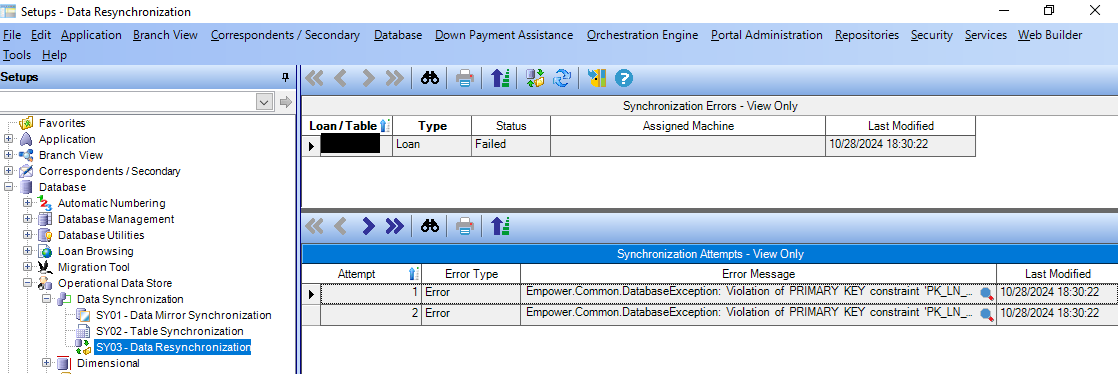
- The Error Messages field has a magnifying glass button in it that will tell you the full reason for the failure. You can right-click the message text, select all, then copy/paste it into a text reader like Notepad.
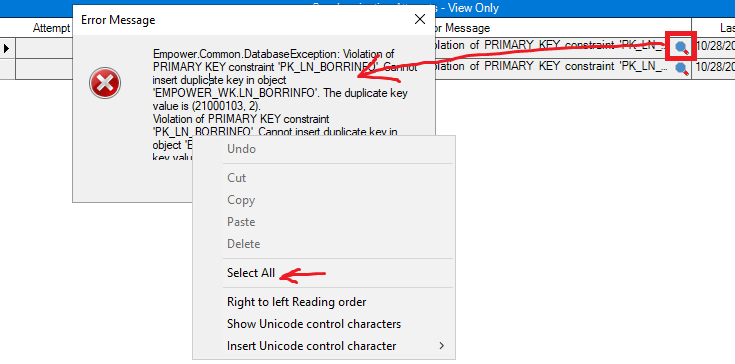
- This info will be useful for triaging the problem. Please capture this info & provide it to Client Success if you submit a ticket for assistance.
Next, what do you do if a loan is stuck in SY03 & you need the data to sync? There is a toolbar button in SY03 that will allow you to attempt a resync for the loan record. Note that this will only work if the problem that caused the loan to get added to SY03 in the first place has been resolved. You can select the loan record in the top grid, then click the Resync button to attempt to resync the loan.
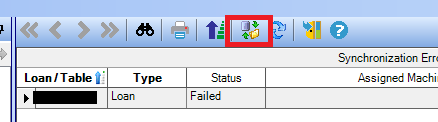
Next, what do you do if you tried the SY03 resync but the record returned? In this case, the details of the Error Message in the lower grid are needed. Please collect this message (& all other relevant data) & submit a ticket to Client Success. A specialist will be able to assist you with this problem.
The next scenario can occur as well: What if a loan's data is out of sync but there is no record in SY03? This does happen & here is what you can do to attempt to resolve the issue. Note that this requires a SQL DBA or someone with administrative access to the client-side ODS database as well as someone that has access to the server where the ODS Synchronization service is running. Please read on.
There is a table in the ODS database that needs to be checked. The table name is ODS_DELTA.DAT_DELTA_SKIPTABLE &, if a loan number is in this table, it will NOT be sync'd to the client-hosted ODS database until the loan record is removed. Run the following SQL query against the client-hosted ODS database to get the records from the table:
SELECT [SKIPKEY]
,[SKIPTYPE]
,[SYNC_STATUS]
,[ASSIGNED_MACHINE]
,[LASTMOD]
FROM [ODS_DELTA].[DAT_DELTA_SKIPTABLE] with (nolock)
If you see a loan number in the results, follow the next steps.
- Remove the loan record from the DAT_DELTA_SKIPTABLE. A SQL DBA team member will be required to perform this step.
- Restart the client-side ODS Synchronization Windows Service. A system administrator will be required for this step. They will need to access the client-side server where the Empower ODS Sync Service if running & restart it. Restarting the service refreshes the service's cache & has no impact to Empower/ODS functionality.
- Open Empower Setups & open SY03. Verify that the loan record is gone or attempt to resync the record from here.
- Once/if SY03 is clear, open OD05. Click the Add toolbar button to add a new record to the grid.
- Commit the changes & hit Save.
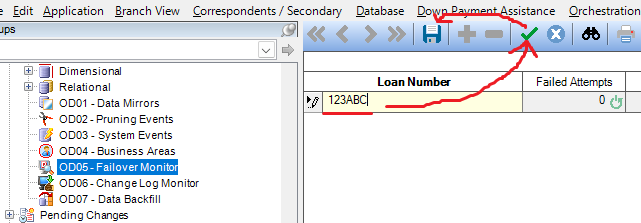
- Monitor OD05 & watch for the new record to be picked up & processed. You can refresh the grid using the toolbar button.
- Once the OD05 record has been processed, start checking the client-side ODS database to see if the loan's data is now up to date. Note that it could take up to 15 minutes for the data to update in the client-side ODS database.
If these steps did not resolve the issue with the loan's data not being updated in the client-side ODS database, please submit a ticket to the Client Success team & a specialist will be happy to assist you.
Was this article helpful?
That’s Great!
Thank you for your feedback
Sorry! We couldn't be helpful
Thank you for your feedback
Feedback sent
We appreciate your effort and will try to fix the article