Required Empower Configuration when Upgrading to v9.6 or Higher
Summary
If you are using the Borrower/Loan Officer Portals and are upgrading to version 9.6 or
higher, the following configurations must be update in both lower environments and during the
production deployment. These steps must be completed in the exact order specified to ensure a
smooth transition.
Please Note: These are also mentioned in the 9.6 Release Notes, which may be missed if not directly taking the 9.6 release and moving straight to a higher version, like 9.6.1 or 9.6.2.
Impacts if not configured:
- Loan Officer assignments to the loans will fail and will not be assigned to the BCD.
- Prevents Loan Officers from being assigned.
- User profiles were not syncing.
It is recommended to perform validation testing in both UAT and Production post changes to ensure that there is no interruption to how your business utilizes the applications.
Required Configuration Steps
1. WS01 – Web Services
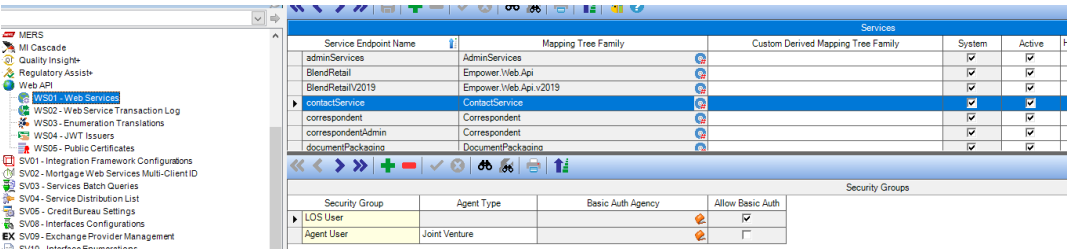
• Ensure that adminServices, contactService and security are set to active.
• Ensure each has the appropriate security group added to their respective child records.
• For Joint Venture (JV) clients using AG04, two security groups must be added.
• If client is not doing Joint Venture loans, then just the Security Group LOS User is needed.
• Example of contactService (same would apply to adminServices)
2. WS04 – JWT Issuers
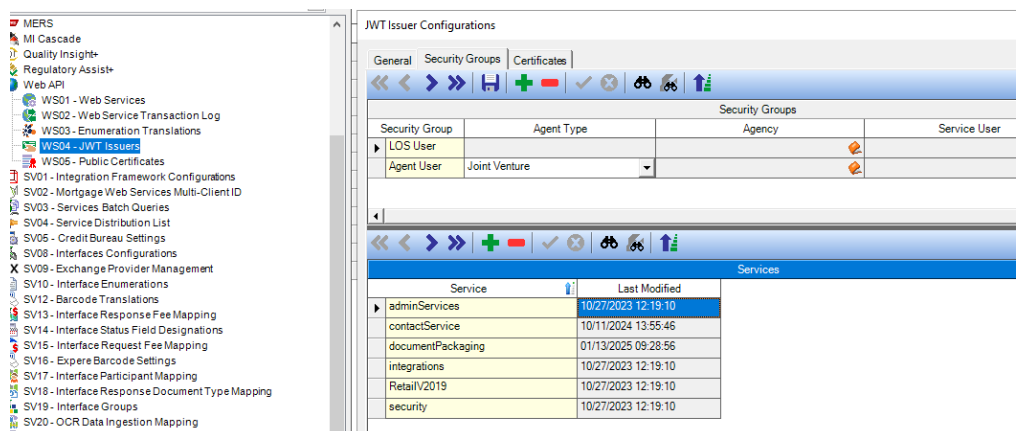
• Verify that the Portal Issuer is configured with the newly activated services (if they are not
already configured).
• For JV loans, the Security Group tab must have two parent records, each containing
the corresponding Services configured as child records.
3. MU03 – Resource Access Permissions
• Client must decide whether to:
o Grant full access to contact.loan at the resource level, OR
o Ensure that the Service User in WS04 has an appropriate role where this permission is explicitly
set to full access.

4. Portal User Sync Execution
• Please reach out to your Account Manager or Delivery Manager to help coordinate a Portal user sync.
• This is a critical step - failure to complete this sync will result in Loan Officer Portal errors.
Was this article helpful?
That’s Great!
Thank you for your feedback
Sorry! We couldn't be helpful
Thank you for your feedback
Feedback sent
We appreciate your effort and will try to fix the article