The OD06 - Change Log Monitor module of Empower Setups can be a powerful tool for understanding how loan data changes were made. What follows are some pointers for understanding the XML data that goes with each OD06 record & how this info can be used to triage issues involving loan data changes.
Pro Tip - It is much easier to read & analyze the OD06 record's XML if it is copy/pasted into another application that can format/colorize XML, such as Notepad++. It also helps to turn on the application's word wrap functionality.
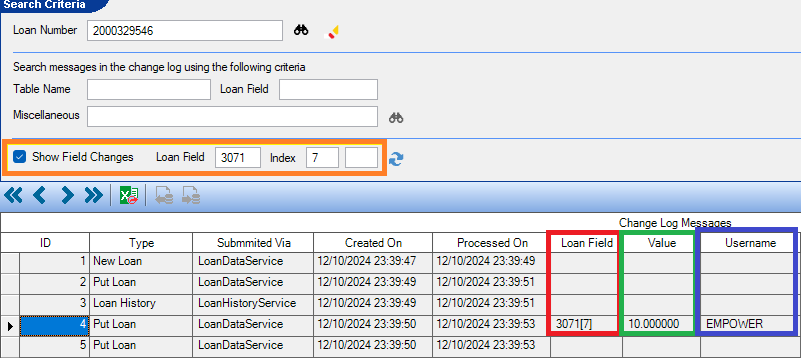
Show Field Changes
The Show Field Changes controls are very important in using OD06 to track down loan data changes & it is recommended that it is used when working with OD06. The reason is because, when the option is turned on, the lower grid will show 3 useful fields:
- Loan Field - The DB number for which you are looking & will be populated if that DB has been updated in the OD06 Put Loan record.
- Value - The actual value that was stored to the DB.
- Username - The name of the user (the User ID) that made the loan data change.
Use the Loan Field & Index fields to look for the DB number that you are tracking.
PutLoanQueryRequest
Moving onto the actual XML for each OD06 record, there are attributes that can help with understanding the source of a loan data change. The <PutLoanQueryRequest> node in the top XML record contains some attributes that can be useful for issue triage.
- UserName- The Empower user ID that made the loan data change.
- This can be looked up in MU01/MU15.
- UserFullName- The full username of the user that made the loan data change.
- This can be looked up in MU01/MU15.
- UpdateTime - The datetime when the loan data change was submitted to Empower.

Loan
The <Loan> XML node also has valuable data that provides insights about the loan in question.
- User - The Empower user ID that made the loan data change.
- This can be looked up in MU01/MU15.
- This can be looked up in MU01/MU15.
- BranchId - The branch ID associated with the loan.
- This can be found in OM01.
- Parent - This will indicate if the loan is part of a combo-loan (aka Linked Loan).
- F = Not linked
- T = Linked
- LinkCategory - This will be populated with an integer value of the linked loan type. If the loan is not part of a linked loan, the value will be 0.

Next, let's look at the structure of the loan data in the XML. The general structure of the loan data is:
- Table - The parent table for the loan data record(s).
- Rows - General row "container" node.
- Row - The loan data record's entry in the database table.
- Columns - The field in the loan data's row/record in the database table (mostly corresponds to DB numbers.
- Row - The loan data record's entry in the database table.
- Rows - General row "container" node.
For example, a loan data save to the LN_MTGTERMS table looks like this:
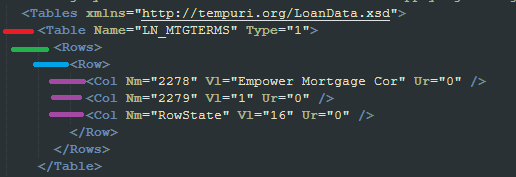
For the most part, the <Col> nodes equate to DB numbers & can be read as such:
- Nm - This is the DB Number
- Vl - This is the value stored to the DB
- Nu="T" - This means that the value of the DB is null (has no value)
In the screenshot above, we can see that
- DB2278 was set to the value of "Empower Mortgage Cor"
- DB2279 was set to the value of "1"
The Nm attribute can also contain the value "RowState" which indicates the type of change that is occurring (add/modify/delete). For now, this topic is out of scope for this article.
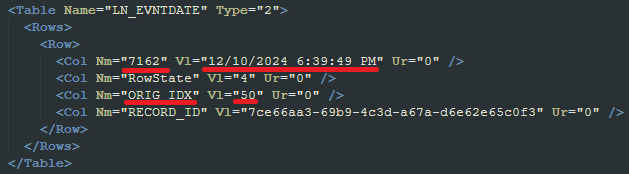
The Nm attribute can also contain values that point to the indexes of "multi" (aka, array) DBs. For example, if Nm contains the string value "ORIG_IDX", the Vl attribute will contain the index of the DB that has been modified. In the below screenshot, we can tell that index 50 of db7162 has been updated to the datetime value of "12/10/2024 6:39:49 PM".
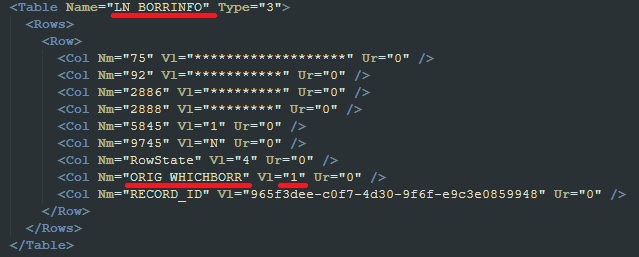
If the value of the Nm attribute contains "ORIG_WHICHBORR", this indicates which borrower on the loan was updated with the data in the corresponding DBs. In the screenshot below, several updates to borrower-single DBs (like db75 - Borrower Full Name) have been made to Borrower 1 (Vl = "1").
Interface Info
Interfaces in Empower make changes to loan data all day every day, & these changes are also tracked in OD06. Typically (but not always), the user ID associated with the OD06 record from an interface call will be listed as Lights Out Processing.

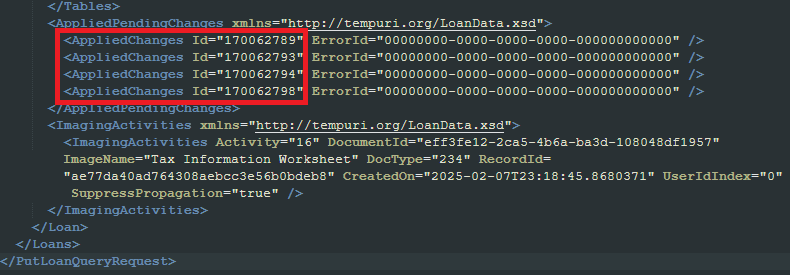
For records like this, at the bottom of the XML will be some useful info about the interface transaction, such as the pending change IDs. These can be viewed in Setups > PE01 to get a full breakdown of the data changes involved in the interface transaction.
Document Activity
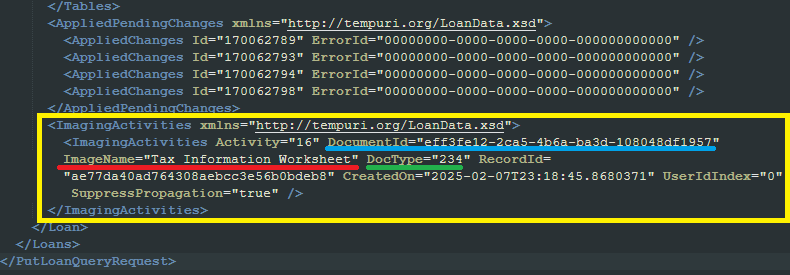
Also, at the bottom of the OD06 XML data can be found any document activity that occurred for the loan data change record. This info is within the <ImagingActivities> XML node & can indicate info such as:
- ImageName- This is the Document Type into which the document was stored.
- Document Types are configured in Setups > DR02.
- DocType - This is the ID of the DR02 document type.
- DocumentId - This GUID value is the unique identifier for the document on the loan & can be used to find the document using Empower's Document Repository & its Find functionality.
DT06 - System Audit Log
OD06 can be used in conjunction with DT06, the System Audit Log (aka the User Screen Visitation History) to fully trace through changes to loan data. To see an example of how to use DT06 with OD06, please review the article titled Using DT06 with OD06 to trace loan data changes.
Was this article helpful?
That’s Great!
Thank you for your feedback
Sorry! We couldn't be helpful
Thank you for your feedback
Feedback sent
We appreciate your effort and will try to fix the article